
Tips & Tricks – Import Data
Import General Comments
- Missing or incorrect data can create issues, ensure that data is checked for missing data or incorrect data before importing.
- Always ensure your data matches (use consistent naming), for example Faculty data is required for the following Import Data – Staff, Subject, Timetable. The the Faculty is called different things across all these Imports then they OneStudent can’t identify them as the same thing. For example, HPE, Health and Physical Education, Health & Physical Education, you would need to identify the preferred naming option and be consistent across all the Import Data files.
- Header row must always be included in imports
- The header row column names must exactly match the template
- Schools should not use Excel to open CSV files, as Excel will re-format data. Such as turning a score like “5/10” into a date “5/10/2022”.
- Instead of Excel, schools should use Notepad++. It’s free and a great tool. QCAA also gives the same advice. We have a tutorial of how to download Notepad++ Click Here.
Importing Subjects
When importing Subjects into OneStudent you need to ensure that the subject codes are correct, or you will experience problems in other areas of OneStudent.
Its about grouping Classes that are the same together to reduce the number of Subject Codes.
Lets say your school has the following Maths Classes, this would be the recommended Subject Code for these particular Subjects.
| No. | Class | Recommended Subject Code |
| 1 | MAE_OS,Essential Mathematics,Math | MAE |
| 2 | MAE111,Essential Mathematics,Math | MAE |
| 3 | MAE112,Essential Mathematics,Math | MAE |
| 4 | MAE121,Essential Mathematics,Math | MAE |
| 5 | MAE122,Essential Mathematics,Math | MAE |
| 6 | MAF101,Mathematics Foundation,Math | MAF |
| 7 | MAG_OS,General Mathematics,Math | MAG |
| 8 | MAG111,General Mathematics,Math | MAG |
| 9 | MAG112,General Mathematics,Math | MAG |
| 10 | MAG121,General Mathematics,Math | MAG |
| 11 | MAG122,General Mathematics,Math | MAG |
| 12 | MAM_OS,Mathematical Methods,Math | MAM |
| 13 | MAM111,Mathematical Methods,Math | MAM |
| 14 | MAM112,Mathematical Methods,Math | MAM |
| 15 | MAM121,Mathematical Methods,Math | MAM |
| 16 | MAM122,Mathematical Methods,Math | MAM |
| 17 | MAS_OS,Specialist Mathematics,Math | MAS |
| 18 | MAS111,Specialist Mathematics,Math | MAS |
| 19 | MAS112,Specialist Mathematics,Math | MAS |
| 20 | MAS121,Specialist Mathematics,Math | MAS |
| 21 | MAS122,Specialist Mathematics,Math | MAS |
| 22 | MAT_OJ,Mathematics,Math | MAT |
| 23 | MAT071,Mathematics,Math | MAT |
| 24 | MAT081,Mathematics,Math | MAT |
| 25 | MAT091,Mathematics,Math | MAT |
| 26 | MAT101,Mathematics,Math | MAT |
| 27 | MAX101,Mathematics Extension,Math | MAX |
There are 27 classes, but only 7 Subject Codes are required.
The following provides an examples of the correct way to create a Subject _Code for Importing into OneStudent.
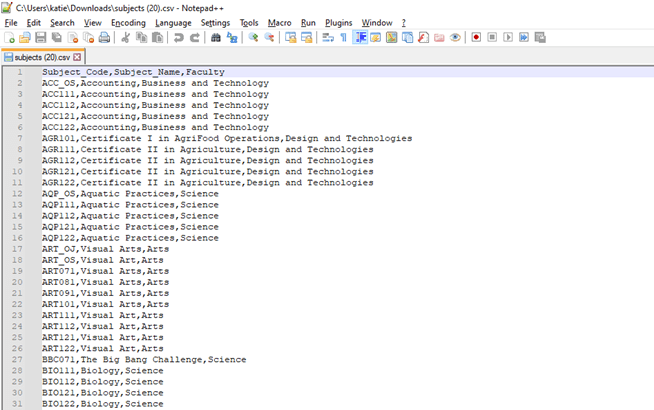
This is the CSV Import File, what you can see is there is a subject Code for each specific group of Subjects. Some Faculty have more than one Subject_Code, that is because there is more than one unique group of subjects within that Faculty. For example, Maths has MAT and MAG.

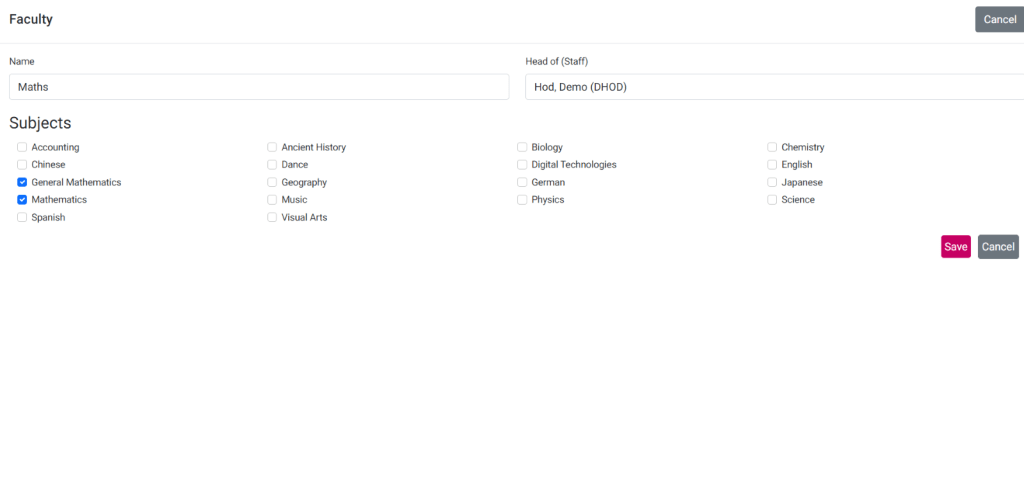
This is how this data is displayed under the faculties page. This is an example for the Maths Faculty, and you can see the two different unique Maths Subjects, General Maths and Mathematics:
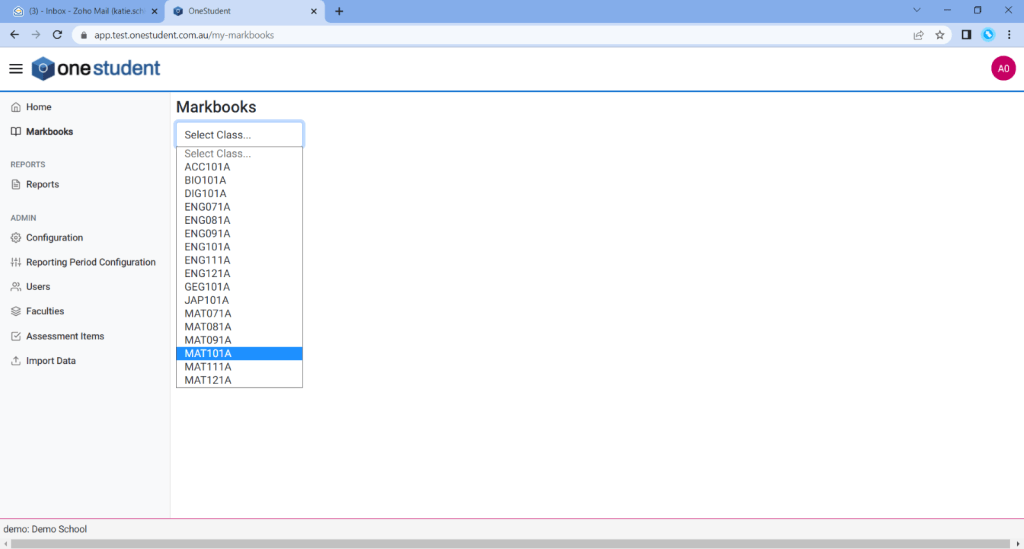
This is the Class Code List from the Markbooks page. You can then see that the codes are then used for multiple classes, for example MAT is used for 6 classes:
The following provides an examples, that is not recommended.
In this example all Subject Codes have been imported, with multiple of them using the same lead letters.
This is how this data is displayed under the faculties page. This is an example is from the Arts Faculty, and you can see there is a duplicate of the same subjects. This is because the OneStudent is looking at the lead letters to indicate and group subject together and this Import created duplicates of the same subject. This then creates issues within OneStudent.
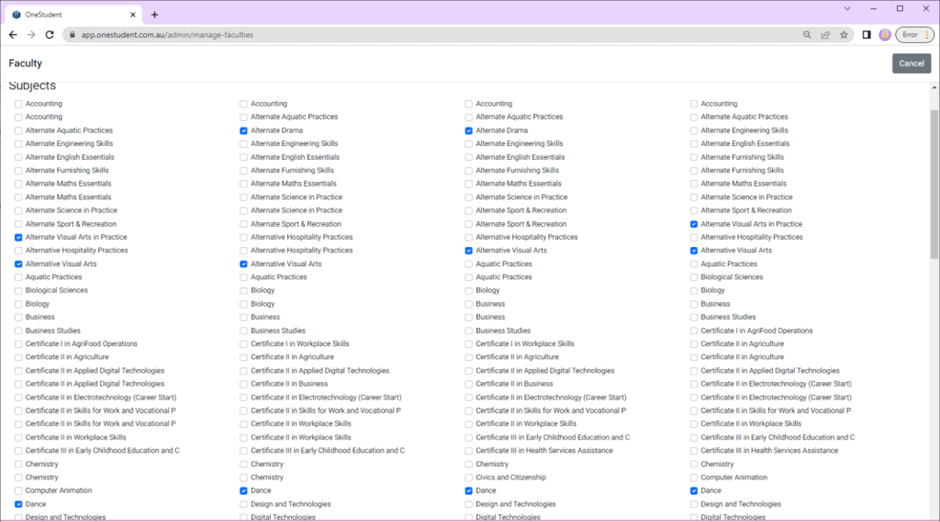
However, under Markbooks the Class code is displayed normal, as seen in the below screenshot.
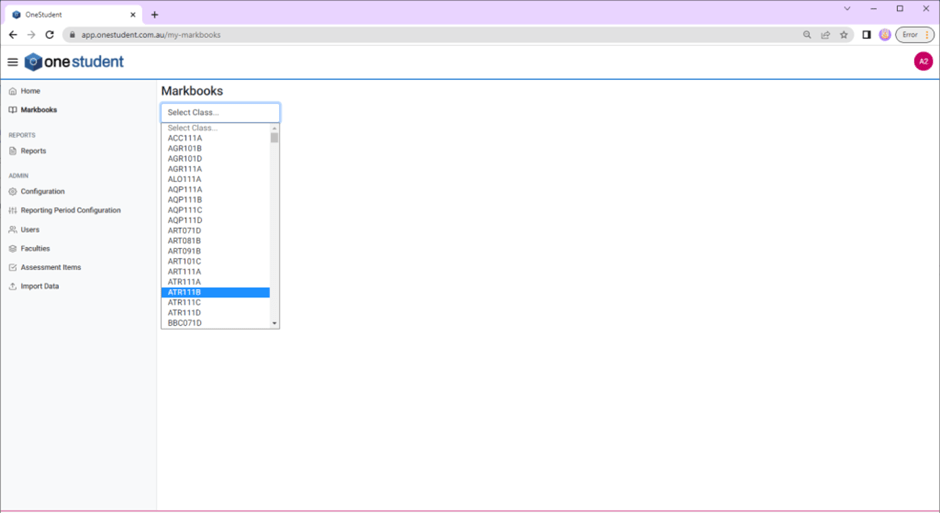
Some of the issue you may experience if the Subject Code are import incorrectly:
- Duplicate Subjects in faculties.
- HOD’s and Teacher experience issues access their Subjects and login in.
If you need assistance with the Import process including the checking of data. Please contact our team.
Examples of Potential Issues and Explanations of Data Points
Timetable – Semester 1
Header Row
Class_Name,Subject_Name,Subject_Level_Code,Day,Date,Period,Start_Time,End_Time,Staff_Id,Staff_MISID, Staff_Code,Staff_Last_Name,Staff_First_Name,Facility_Code,Facility_Name
Sample
Class_Name,Subject_Name,Subject_Level_Code,Day,Period,Start_Time,End_Time,Staff_MISID,Staff_Code, Staff_Last_Name,Staff_First_Name,Facility_Code,Facility_Name
ACC111A,Accounting,11,MON,Period 3,13:20,14:30,hjswa3, SWANHI,Swank,Hilary,G211,Computer Lab
ACC121A,Accounting,12,MON,Period 3,13:20,14:30,gadav1,DAVIGE,Davis,Geena,G214,Computer Lab
AEN071D,Aspire English,7,MON,Period 1,9:00,10:10,wjhar37,HARRWO,Harrelson,Woody,I1.18,General Learning Area
Notes
ACC111A = Class_Name
Accounting = Subject_Name
11 = Subject_Level_Code
MON = Day
Period 3 = Period
13:20 = Start_Time
14:30 = End_Time
ctyle3 = Staff_MISID
TYLECA = Staff_Code
Tyler = Staff_Last_Name
Cassandra = Staff_FIrst_Name
G211 = Faculty_Code
Computer Lab = Faculty_Name
Timetable – Semester 2
Header Row
Class_Name,Subject_Name,Subject_Level_Code,Day,Date,Period,Start_Time,End_Time,Staff_Id,Staff_MISID, Staff_Code,Staff_Last_Name,Staff_First_Name,Facility_Code,Facility_Name
Sample
Class_Name,Subject_Name,Subject_Level_Code,Day,Date,Period,Start_Time,End_Time,Staff_Id,Staff_MISID, Staff_Code,Staff_Last_Name,Staff_First_Name,Facility_Code,Facility_Name
ACC112A,Accounting,11,MON,Period 3,0.555555556, 0.604166667,hjswa3,SWANHI,SwankHilary,G211,Computer Lab
ACC122A,Accounting,12,MON,Period3,0.555555556, 0.604166667,gadav1,DAVIGE,Davis,Geena,G214,Computer Lab
AEN072D,Aspire English,7,MON,Period 1,0.375, 0.423611111,wjhar37,HARRWO,Harrelson,Woody,I1.18,General Learning Area
Notes
This is an example is the same template as Timetable – Semester one however within the Class_Name ACC112A the 2 was changed from a 1 signifying that it is the second semester for this particular class. also within this example there is a demonstration how excel reformates data, in this example you can see that the start time and end time has been changed to decimal points.
Subjects
Header Row
Subject_Code,Subject_Name,Faculty
Sample
Subject_Code,Subject_Name,Faculty
ACC11,Accounting,BID
AEN,Aspire English,Junior English
AHS,Ancient History,Senior Humanities
Notes
Within this example the Subject_Code should only be 3 characters not ACC11 as this is just for a list of subjects, not a list of subjects not a list for specific year levels.
Students
Header Row
Student_Name,EQID,LUI,Date_of_Birth,Sex,Roll_Class,Year
Sample
Student_Name,EQID,LUI,Date_of_Birth,Sex,Roll_Class,Year
“Einstein,Albert”,1456987523A,2313157279,2-Nov-2006,F,9R,09
“Hepburn,Katharine”,4696537100A,8126585861,17/04/2007,F,10M,10
“Legend,John”,7862555001A,,22-Jun-2008,F,8N,08
Notes
Within Students the Student_name should be in this format “Einstein,Albert”. Including the quotation marks and the comma the field. Also within this example shows that only senior student have a LUI.
Student Classes
Header Row
EQID,Class_Name
Sample
EQID,Class_Name
0033743450G,FCD102A
0033743450G,FCF102B
0033743450G,PEG102L
Notes
This is just an Example of how Student Classes should look.
Staff
Header Row
First_Name,Last_Name,Staff_Code,Email,Username,Role,Position,Faculty
Sample
First_Name,Last_Name,Staff_Code,Email,Username,Role,Position,Faculty
Zellweger, Renee,ZELLRE,razel19@eq.edu.au,razel19,Teacher,Snr-Mathematics,”Junior Maths, Senior Maths”
Wilson, Owen,OWENWI,ojwil0@eq.edu.au,ojwil0,Head of Department,HOD-Languages,Languages
Thurman, Uma,THURUM,uvthu0@eq.edu.au,uvthu0,Head of Year,HOD-Student Services,Senior English
Phoenix, River,PHOERI,rfpho1@eq.edu.au,rfpho1,Admin,PR-Secondary,Principal
Notes
The role column is very important as it is used to allocate permissions when the user logs in to OneStudent.
Valid values are:
- Teacher
- Head of Department
- Head of Year
- Admin
General Comment Bank
Header Row
Comment_Type,Criteria_Type,Criteria_Value,Comment_Code
Sample
Comment_Type,Criteria_Type,Criteria_Value,Comment_Code
GEN,Assessment Type,Assignment:,Z0002
GEN,Assessment Type,Assignment: Written,Z0003
GEN,Assessment Grade,0/20,Z0143
GEN,Assessment Grade,1/20,Z0144
GEN,Assessment Grade,2/20,Z0145
GEN,Assessment Grade,3/20,Z0146
Notes
Use GEN for general comment.
This is the criteria to match the comment on. This can be set to “Assessment Type” or “Assessment Grade”.
Assessment Type will attempt to match an Assessment Type value that has been set for the Assessment Item.
Z0143 will attempt to match on the result of the assessment item.
Learning Area Comment Bank
Header Row
LA_Code,LA_Faculty,Subject,Year_Level,Criteria,Comment_Description,Comment_Code
Sample
LA_Code,LA_Faculty,Subject,Year_Level,Criteria,Comment_Description,Comment_Code
1,The Arts,Visual Arts,7,Overall Result,A+,A0003
1,The Arts,Visual Arts,7,Overall Result,A,A0004
1,The Arts,Visual Arts,7,Overall Result,A-,A0005
Notes
The faculty is set here. So when a student gets a result for a student within the faculty (e.g. The Arts) then this lot of comments will be used.
Improvement Comment Bank
Header Row
LA_Code,LA_Faculty,Subject,Year_Level,Criteria,Comment_Description,Comment_Code
Sample
LA_Code,LA_Faculty,Subject,Year_Level,Criteria,Comment_Description,Comment_Code
GEN,GEN,GEN,XX,SKILLS BASED LEARNING COMMENTS,”{Name} has benefitted from {her,his} participation in the Skills Based Learning program this semester.”,X0120
GEN,GEN,GEN,XX,SKILLS BASED LEARNING COMMENTS,{Name} has made slow but steady progress in the Skills Based Learning program this semester.,X0121
01,The Arts,Media Arts,XX,MEDIA ARTS IMPROVEMENT,”In order to improve {her,his} results, {Name} needs to construct purposeful representations and insightfully use genre and media conventions.”,A0124
01,The Arts,Media Arts,XX,MEDIA ARTS IMPROVEMENT,”{She,He} must also construct purposeful representations and insightfully use genre and media conventions.”,A0125
Notes
These are comments that a teacher can set for a student in their class.
Improvement comments can be general or faculty specific.
Grade Mappings
Header Row
Scale,Mark,Grade
Sample
Scale,Mark,Grade
20,0,E
20,1,E
20,2,E
20,3,E
Notes
Grade mappings can be used to override the setting of a grade based on a student result.
For e.g., a grade of “E” will be applied if the student receives a 2/20
 OneStudent