
Student Profile
Student Profile – View Academic Data
The Student Profile page in OneStudent allows users to search for and view student academic results. It supports detailed views and downloads of results by student, class, or a combination of both. This tool is particularly useful during Parent-Teacher
interviews, academic reviews, and for identifying students needing early intervention.
Student Profile Overview
The Student Profile page contains two tabs:
- Student Tab – Search for and view data related to an individual student.
- Class Tab – View and download class-based academic data, with optional student filtering.
Student Tab
This tab is used to search by EQ Student ID and view or download that student’s academic performance.
To Load a Student Profile:
- Navigate to the Student Profile section.
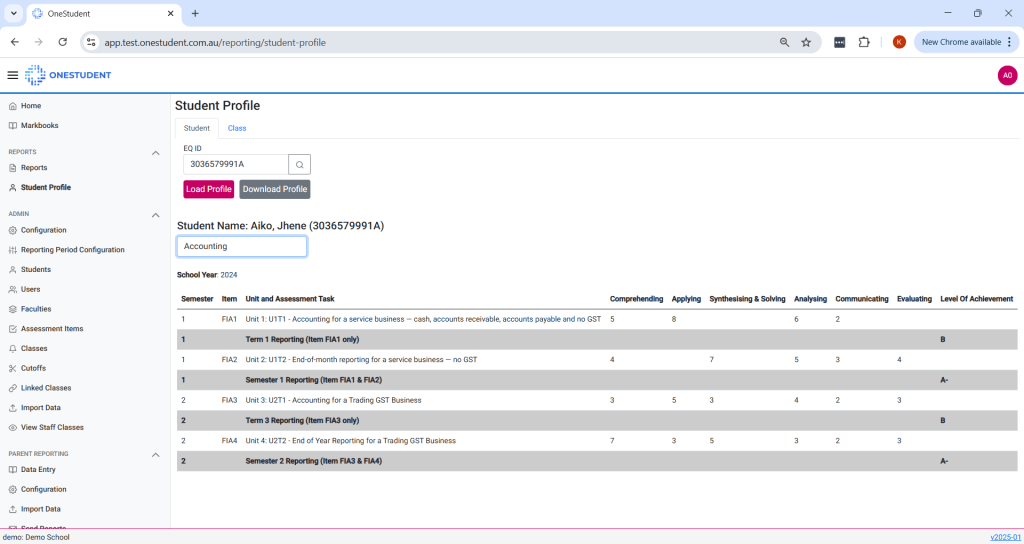
- On the Student tab, enter the student’s EQ ID.
- Click Load Profile.
- Once loaded, select a Class to display the student’s results for that specific class on screen.
To Download Full Student Profile:
- After loading the student, click Download Profile to download the student’s academic results across all classes.
Class Tab
This tab allows you to search by Class Code, with the option to filter by Student.
Search Options:
- Class Code only – Returns academic data for all students in that class.
- Class Code + Student – Returns academic data for the selected student within the selected class.
To Download Class Results:
- Enter the Class Code, then click Download Class to download a report of all students’ results in that class.
To Download a Student’s Results for a Specific Class:
- Enter both the Class Code and Student EQ ID, then click Download Class.
- This will generate a download showing the selected student’s results in that specific class only.
Summary of Use Cases
| Task | Use Tab | Action |
|---|---|---|
| View a student’s class result on screen | Student | Enter EQ ID → Load Profile → Select Class |
| Download all results for one student | Student | Enter EQ ID → Load Profile → Download Profile |
| Download all students’ results for a class | Class | Enter Class Code → Download Class |
| Download one student’s results for a specific class | Class | Enter Class Code + EQ ID → Download Class |
Example of OneStudent – Student Profile – Student EQ ID + Class:
 OneStudent