
Reporting Period Configuration
Reporting Period Configuration – Functionality and Options
The Reporting Period Configuration – Manage Reporting Period Configuration page allows the Administrator or Head of Department to define the academic reporting requirements for each subject for the entire year.
The Reporting Period Configuration can only be configured once Configuration, Import Data and Assessment Items are completed.
The Reporting Period for each subject is divided into term 1, semester 1, term 3, semester 2.
The options for each subject are then defined, using the following options:
- Task or Criteria?
- What are the Assessment item for this term or semester a Task or a Criteria?
- Use Letter, Percentage or Total for Cumulative
- What is the end grade going to be based off a Letter, a Percentage, or a Total Cumulative Percentage?
- Include Satisfactory?
- Assessment Items?
- What Assessment Items are required by the end of this reporting period, for the student to pass?
- Use Weightings?
Manage Reporting Configuration – New or Modifications
To Manage Reporting Configuration:
- From the Reporting Period Configuration page.
- Select the relevant Class from the Select Class drop down list.
- The Manage Reporting Period options will be displayed.
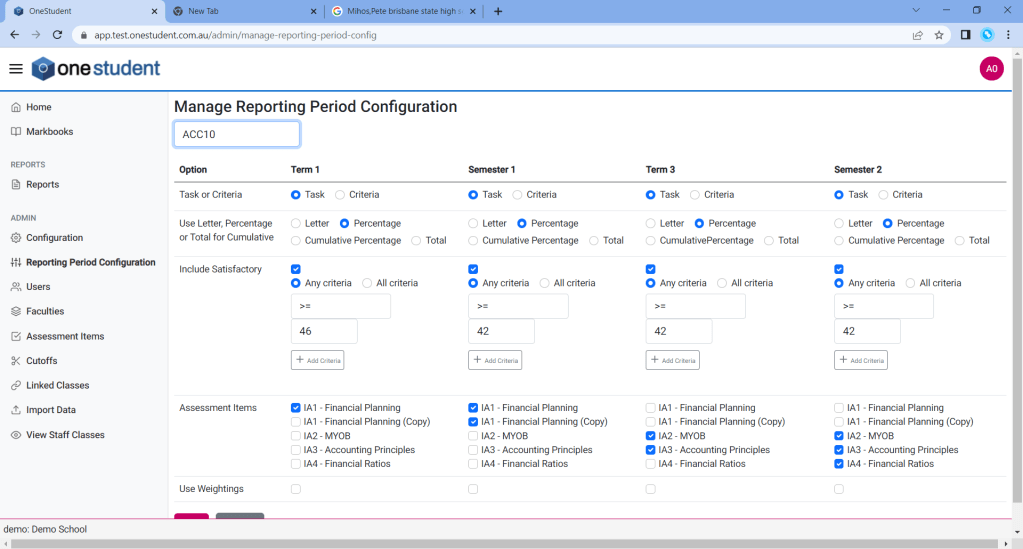
- Select the relevant options for each item within the section.
- Update as required.
- Once completed selected Save, all changes will be updated.
Assessment Item Weightings
Assessment Item Weightings allow schools to define how much each Assessment Item contributes to the overall result for a Reporting Period.
Weightings are configured within the Manage Reporting Period Configuration page and are used when reporting calculations are based on weighted assessment results. This gives schools the flexibility to place greater emphasis on major pieces of assessment, such as examinations or projects, while reducing the impact of smaller formative tasks.
How Weightings Work
Each Assessment Item included in a Reporting Period can be assigned a weighting value. The higher the weighting, the greater influence that Assessment Item has on the student’s overall calculated result for that Reporting Period.
For example:
| Assessment Item | Weighting |
|---|---|
| Assignment 1 | 20% |
| Research Task | 30% |
| Examination | 50% |
In this example, the Examination contributes more heavily to the final result than the other Assessment Items.
Important
The Weighting field is only available for Assessment Items that have been selected in the Assessment Items section of the Reporting Period Configuration.
Before a weighting can be applied:
- Open the relevant Reporting Period Configuration.
- Select the Assessment Items that will contribute to the Reporting Period.
- Save or confirm the Assessment Item selection.
- Enter the weighting values for each selected Assessment Item.
If an Assessment Item has not been selected in the Assessment Items section, it will not be available for weighting and will not contribute to reporting calculations.
WHY THIS MATTERS
Weightings ensure that reporting calculations accurately reflect your school’s assessment and moderation requirements. Correctly configured weightings help maintain consistency across classes, subjects, and faculties while supporting transparent reporting outcomes.
SUCCESS LOOKS LIKE
All Assessment Items contributing to the Reporting Period have an appropriate weighting assigned, and the combined weightings align with your school’s reporting policy.
No Result Handling:
The No Result Handling option is used within the Academic Cumulative Report.
If set to “No Result” and there are any NRs recorded for any assessment items in the report, then Overall is set to “NR”
If set to “Ignore” then any NRs recorded for assessment items are ignored and do not contribute to the Overall grade.
 OneStudent