
Reporting Period Configuration
Reporting Period Configuration – Functionality and Options
The Reporting Period Configuration – Manage Reporting Period Configuration page allows the Administrator or Head of Department to define the academic reporting requirements for each subject for the entire year.
The Reporting Period Configuration can only be configured once Configuration, Import Data and Assessment Items are completed.
The Reporting Period for each subject is divided into term 1, semester 1, term 3, semester 2.
The options for each subject are then defined, using the following options:
- Task or Criteria?
- What are the Assessment item for this term or semester a Task or a Criteria?
- Use Letter, Percentage or Total for Cumulative
- What is the end grade going to be based off a Letter, a Percentage, or a Total Cumulative Percentage?
- Include Satisfactory?
- Assessment Items?
- What Assessment Items are required by the end of this reporting period, for the student to pass?
Manage Reporting Configuration – New or Modifications
To Manage Reporting Configuration:
- From the Reporting Period Configuration page.
- Select the relevant Class from the Select Class drop down list.
- The Manage Reporting Period options will be displayed.
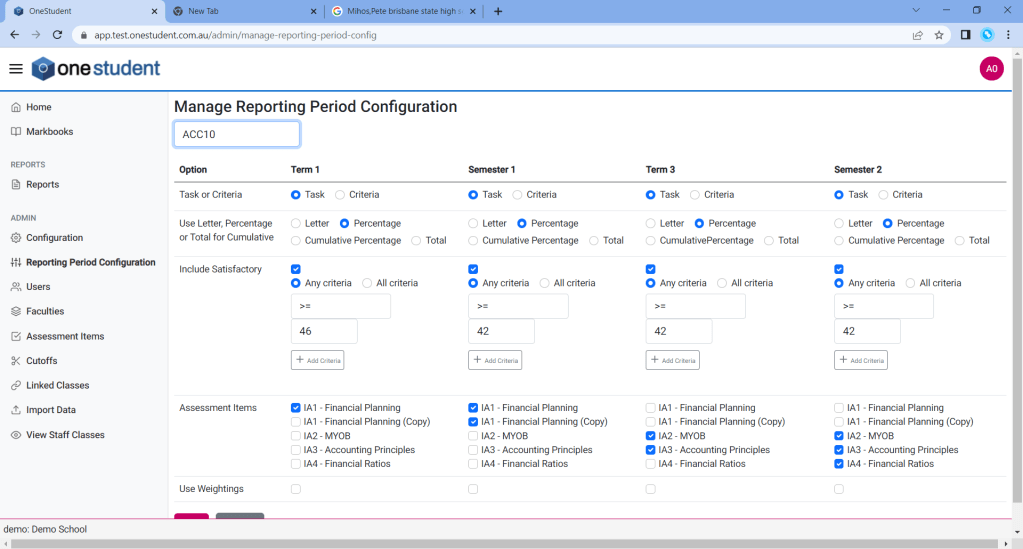
- Select the relevant options for each item within the section.
- Update as required.
- Once completed selected Save, all changes will be updated.
 OneStudent