
Configuration
Configuration – Functionality and Options
The Configuration – Manage Configuration page allows the Administrator user to configure various settings specific to the school.
The filed options available for the Configuration – Manage Configuration page are:
- School Code,
- School Name,
- School Year,
- Current Semester,
- School Logo,
- Year Levels.
Example of OneStudent – Configuration – Manage Configuration page:
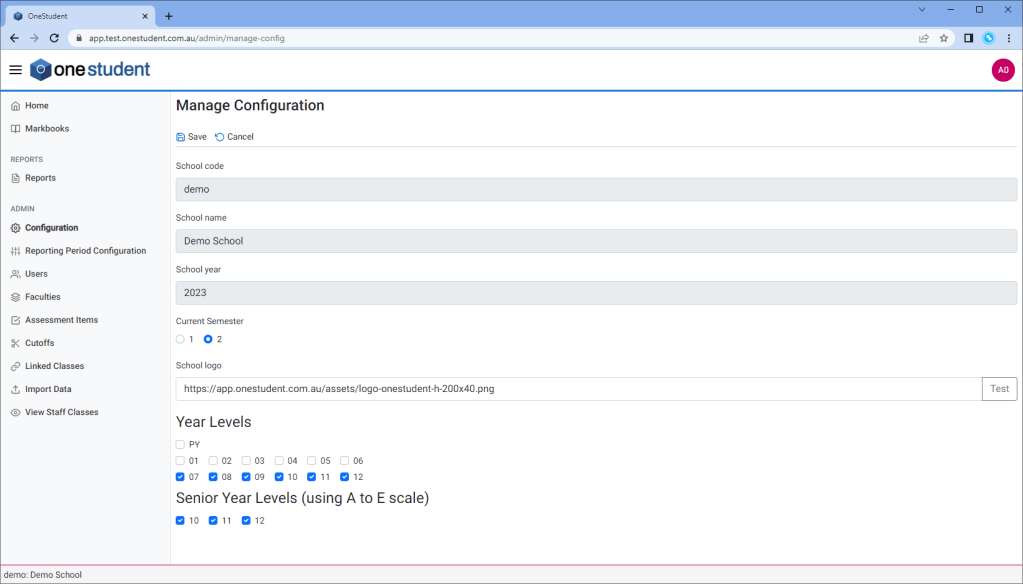
Manage Configuration – New
The Configuration – Manage Configuration page must be completed prior to any other OneStudent set-up tasks.
To Manage Configuration:
- From the Configuration – Manage Configuration page.
- Enter or select relevant:
- School Code,
- School Name,
- School Year,
- Current Semester,
- School Logo, (if required)
- Year Levels,
- Senior Year Levels (using A to E scale)
- Once complete select Save.
All changes will be updated.
Manage Configuration – Modifications
Modifications will be required on the Configuration – Manage Configuration page, these modifications include:
- School Year – which needs to be modified before the start of a new year each semester.
- Current Semester – which needs to be modified before moving into Semester 2.
- School Logo – which needs to be modified if or when changes are made to the school makes logo
- Year Levels – which needs to be modified if or when Year Levels need to be added or removed from OneStudent.
 OneStudent